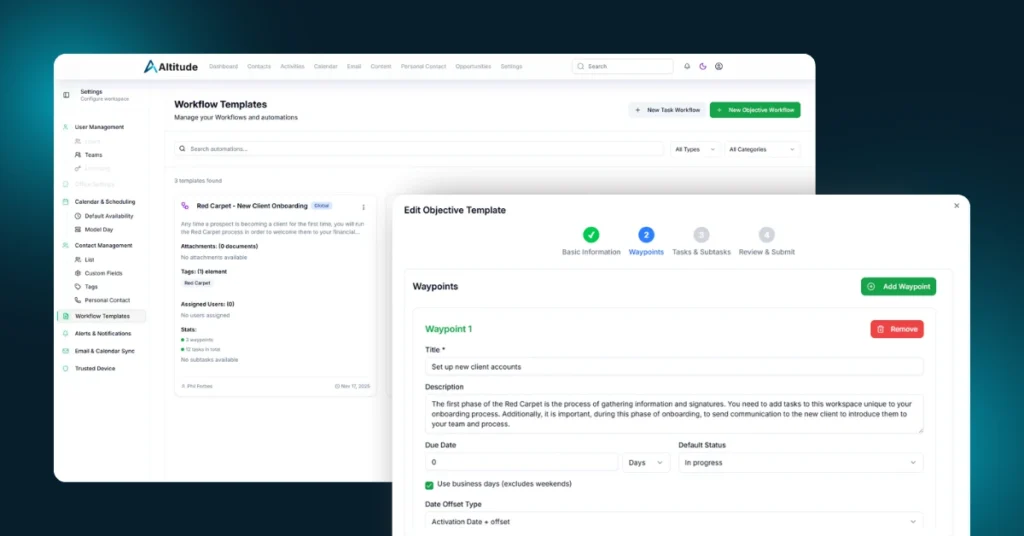
If you are watching Altitude from the outside, this is one of the updates worth paying attention to. Advisors using Altitude just gained access to a brand-new Workflows system that transforms how firms organize, assign, and manage the work that drives their business.
This is the kind of feature that separates modern CRMs from legacy systems. Altitude users now have tools designed for how real advisory teams actually operate.
And this is only Version 1.
A Major New Advantage for Altitude Users: Workflows Version 1
After several weeks of heavy development, rigorous testing, and late-night collaboration, Workflows are now live for everyone on Altitude.
Workflows give advisors a structured, repeatable system for every major process in their business.
Client onboarding. Annual reviews. Event follow-up. Marketing campaigns. Compliance preparation.
Anything your team does repeatedly can now be standardized, delegated, tracked, and improved through Altitude.
With Workflows, Altitude users can now:
- Build multi-step processes that run the same way every time
- Assign tasks to team members with full visibility
- Track progress through clear milestones
- Create templated versions of their most important procedures
- Operate with consistency across service, sales, and operations
- Reduce the chaos and confusion that slows teams down
And this is just the beginning.
Over the next six to eight weeks, Altitude will extend Workflows with new capabilities including:
- Automated message sending
- Triggers that activate Automations
- Deeper tracking of task ownership
- Sequential and conditional logic
- Team and role-based task distribution
- Enhanced reporting visibility
The more complex your business processes are, the more powerful Workflows will become.
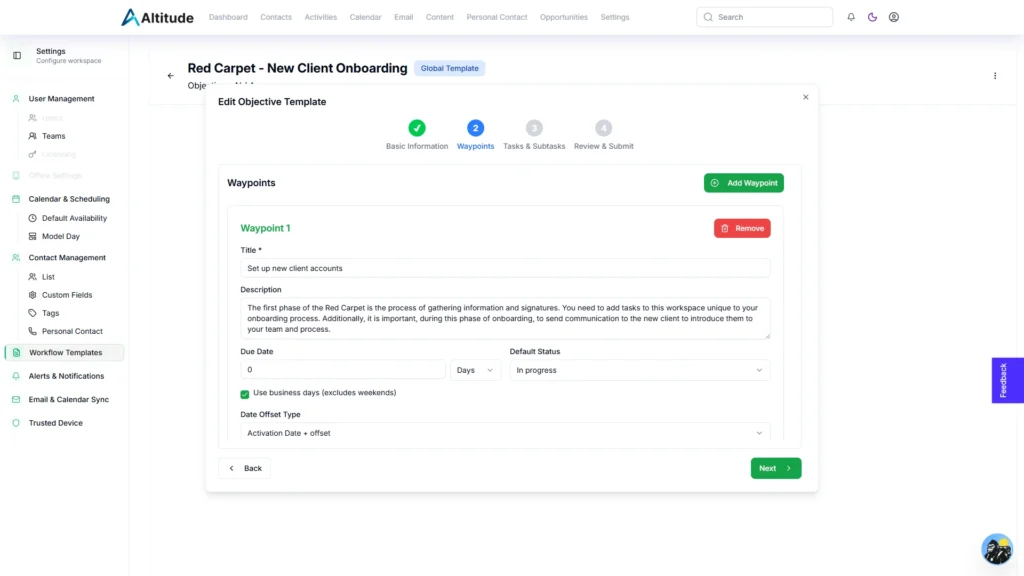
A Look Inside the Altitude Workflow System
Workflows follow a structured hierarchy designed to match the realities of advisory work:
Objective → Waypoint → Task → Subtask
This allows firms to document both strategic initiatives and daily operational work in a way that is clean, logical, and easy to manage.
Objectives
The big processes that define your business.
Examples: onboard a client, run a review, launch a client event.
Waypoints
Major milestones inside an Objective.
Examples: documents collected, paperwork prepared, plan delivered.
Tasks
Individual assignments with a single owner and deadline.
Subtasks
The checklist items that make tasks truly complete.
This structure replaces scattered notes, informal checklists, and inconsistent processes with something predictable and scalable. For advisory teams growing in size, capacity, or ambition, this is a game changer.
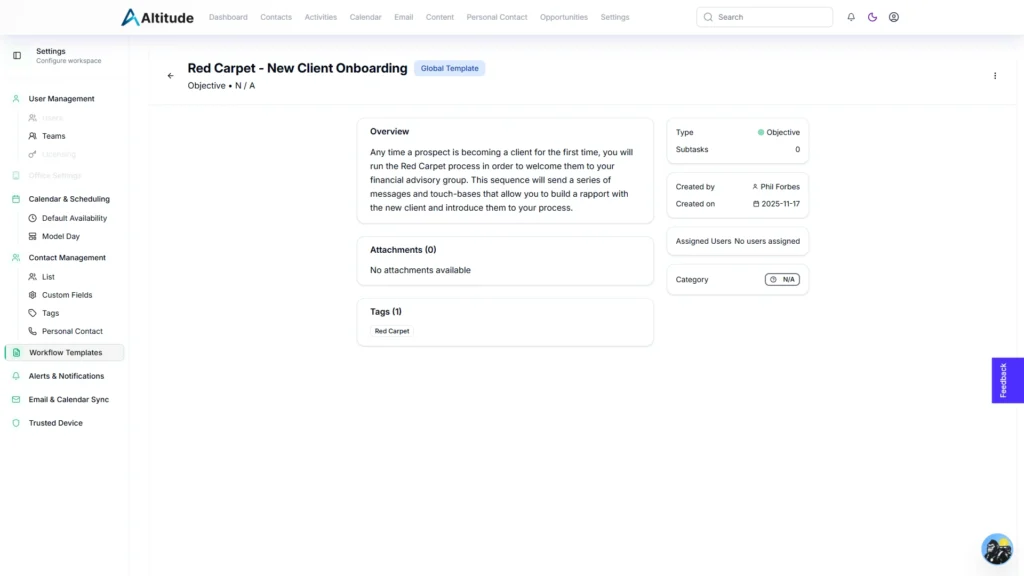
Workflow Builder and Library
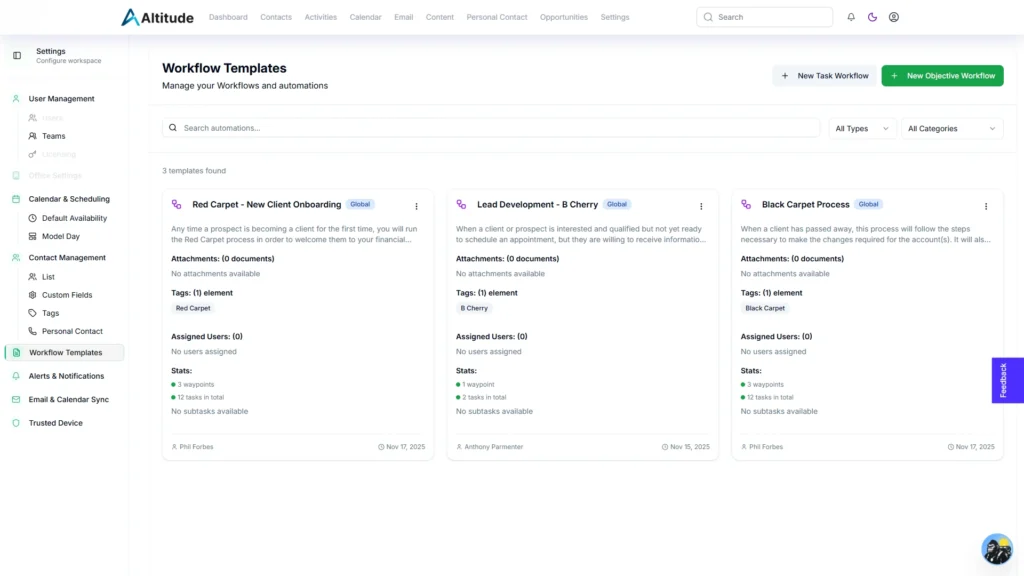
Advisors using Altitude get access to a dedicated Workflow Library under Settings. This is where teams build, adjust, duplicate, and refine their workflows.
Altitude supports:
- Full customization of every step
- Event-based or date-based timing
- Calendar and business day offsets
- Task-level instructions
- Subtask-level checklists
- Firm-level workflow templates
We have already included a starter set of workflows to help advisors get moving quickly. But firms are also encouraged to build their own and tailor them to their standards.
Altitude is not a one-size-fits-all CRM. It is built for advisors and teams that want control.
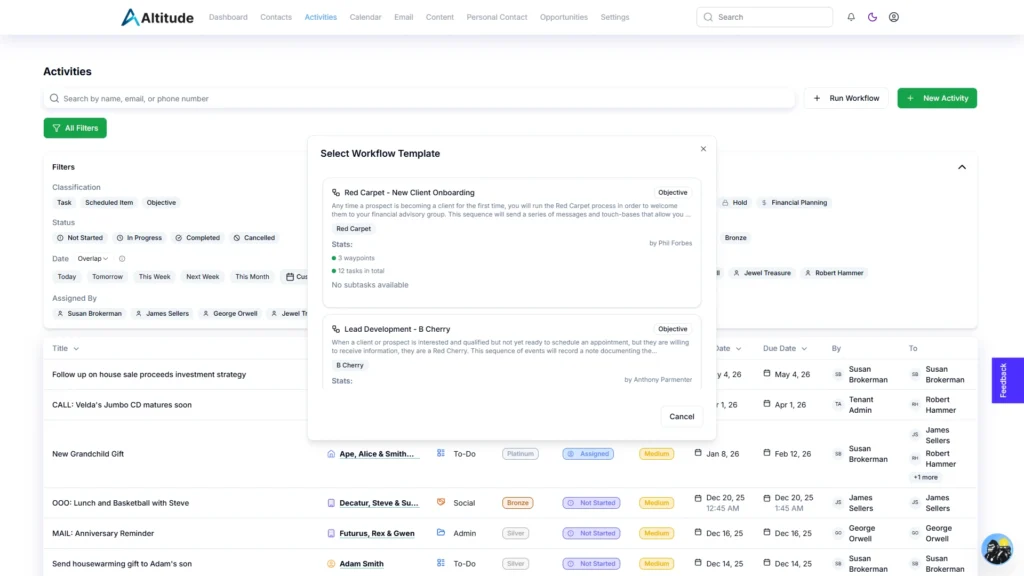
Running Workflows Inside Your Activities Workspace
Once a workflow is created, launching it takes only a few seconds.
- Select Run Workflow
- Choose the template
- Assign the owner
- Select the client or household
- Choose a start date
Altitude then places the entire workflow into your Activities list with full visibility into what needs to be done, who is responsible, and what comes next.
Teams can:
- Reassign work
- Attach documents
- Update timing
- Modify roles
- Adjust sequencing
- Save any changes as a new template
Everything stays organized in one place. Nothing gets lost.
Why Advisors Not Using Altitude Should Take Note
Workflows introduce a level of structure and efficiency that most CRMs don’t offer. This is the foundation for what Altitude will deliver next.
Upcoming releases will unlock:
- Pathfinder driven next-step recommendations
- Automated timelines built from your workflows
- Triggered actions that run hands-free
- Data-driven predictions about bottlenecks and capacity
Advisors on Altitude are stepping into a system being designed for how modern advisory teams actually function.
If your current CRM feels rigid, outdated, or disconnected from how your business runs, Workflows alone may be the reason to take a closer look.
Additional Enhancements Released This Week
For advisors already using Altitude, this week also included improvements to:
- Task attachments
- Calendar event display
- Calendar Sync stability
- Pathfinder context accuracy
- Personal Contact Interval logic
- Info Sheet reporting
- Custom Fields in reports and exports
- Settings navigation
- Recurring meeting display
- Sorting and data-entry reliability
- Activities Due exports
These refinements make everyday work smoother and faster, supporting the features that advisors rely on.
Coming Soon for Altitude Users
Our team is currently developing:
- A complete License Management and Billing workspace
- A full Assets Workspace including Accounts, Portfolios, and custodian integrations
- Altitude Bookings, built to replace scheduling tools like Calendly
- A redesigned Letter experience with cleaner previews and Word exports
These are not small enhancements.
They are the next steps toward a single unified platform that supports every part of an advisor’s workflow.
If You Are Not Using Altitude Yet
Now is the time to pay attention. The platform is evolving rapidly. The features rolling out this year and early next year will reshape what advisors expect from their tech stack.
Advisors on Altitude gain access to:
- Faster workflows
- Better automation
- Clearer visibility
- Stronger team coordination
- Modern tools designed for how real advisory firms operate
Whether you are on Redtail, Wealthbox, G5, or another legacy CRM, Altitude is built to be the next step forward.
If you want a system that moves with your business instead of slowing it down, we would love to show you what we are building with a personal demo.