

For a long time, Act! CRM did exactly what it promised.
It helped small businesses organize contacts. Track customer interactions. And bring some structure to the sales process. And for years, that was enough.
But business has changed.
Financial Services sales teams became more mobile.
Customer expectations increased.
Marketing automation stopped being a bonus and became table stakes.
And CRM software stopped being a digital filing cabinet and started becoming the system that runs the business.
That’s where the friction begins.
In user reviews, a pattern shows up again and again.
Not anger.
Not outrage.
Just a quiet realization that the tool no longer fits the way the work gets done in 2026.
Dashboards feel dated. Workflows feel manual. Reporting feels slow. Outlook sync issues create doubt about what’s actually logged. And customization often adds even more complexity.
The problem isn’t that Act! CRM is broken.
The problem is that many teams have outgrown it.
Today’s CRM system is expected to do more than store customer data.
It’s expected to:
- Streamline follow-ups.
- Have fully implemented AI Systems
- Support marketing campaigns and email campaigns.
- Give sales pipeline visibility in real time.
- Reduce the learning curve for new team members.
- And adapt as business needs change.
That’s why more financial advisors are searching for Act! alternatives.
Not because they want more software.
But because they want less friction.
In this article, we’ll look at the best Act! CRM alternatives for modern financial advisors and sales teams. Tools that are cloud-based, user-friendly, scalable, and built for how work actually happens today.
What to Look For in an Act! CRM Alternative
When advisors and sales teams start looking for Act! CRM alternatives, they’re usually not chasing shiny features.
They’re trying to fix very specific, everyday problems.
The right CRM software shouldn’t feel like another project to manage. It should quietly support how the business already runs.
Here’s what actually matters.
A User-Friendly Interface Your Team Will Actually Use
If the CRM isn’t easy to use, it won’t get used consistently.
That means:
- A clean dashboard that shows what matters today
- Fewer clicks to get where you need to go
- A short learning curve for new hires
- A user interface designed for daily work, not power users only
Ease of use isn’t a “nice to have.”
It directly impacts data quality and adoption.
Strong Contact Management and Customer Data Organization
At its core, customer relationship management is about trust in the data.
A modern CRM system should:
- Keep contact management simple and accurate
- Organize customer data without duplication
- Track customer interactions automatically
- Support segmentation as your book of business grows
If advisors don’t trust what’s in the CRM, they stop relying on it.
Clear Sales Pipeline and Follow-Up Visibility
Sales pipeline visibility shouldn’t require digging through reports.
The right sales CRM gives you:
- Real-time pipeline management
- Clear follow-ups and notifications
- Confidence that nothing slips through the cracks
- A sales process that’s visible to the entire team
That visibility is what allows sales teams to stay proactive instead of reactive.
Built-In Automation That Actually Saves Time
Marketing automation and workflows shouldn’t feel bolted on.
Look for automation features that:
- Streamline follow-ups
- Reduce manual data entry
- Support email campaigns and marketing campaigns
- Help optimize the sales process without constant tweaking
If automation creates more setup work than it saves, it’s not automation.
Reliable Integrations With the Tools You Already Use
Most teams live in Microsoft Outlook, Gmail, and cloud-based tools all day.
Your CRM solution should:
- Integrate cleanly with Outlook and Gmail
- Sync without breaking
- Support seamless integration through APIs
- Work naturally in a cloud-based environment
If integrations are fragile, trust erodes fast.
Scalability Without Add-Ons Everywhere
As businesses grow, complexity creeps in.
A scalable CRM:
- Handles more customer data without slowing down
- Doesn’t require endless add-ons to unlock basic functionality
- Supports team collaboration as sales teams expand
You shouldn’t have to re-platform every few years just to keep up.
Insights That Help You Act, Not Just Report
Dashboards and reports are only useful if they drive action.
The best CRMs for financial advisors:
- Surface what needs attention now
- Highlight risk and opportunity
- Support better decision-making in real time
Storing data is easy. Turning it into insights that are useful is the hard part.
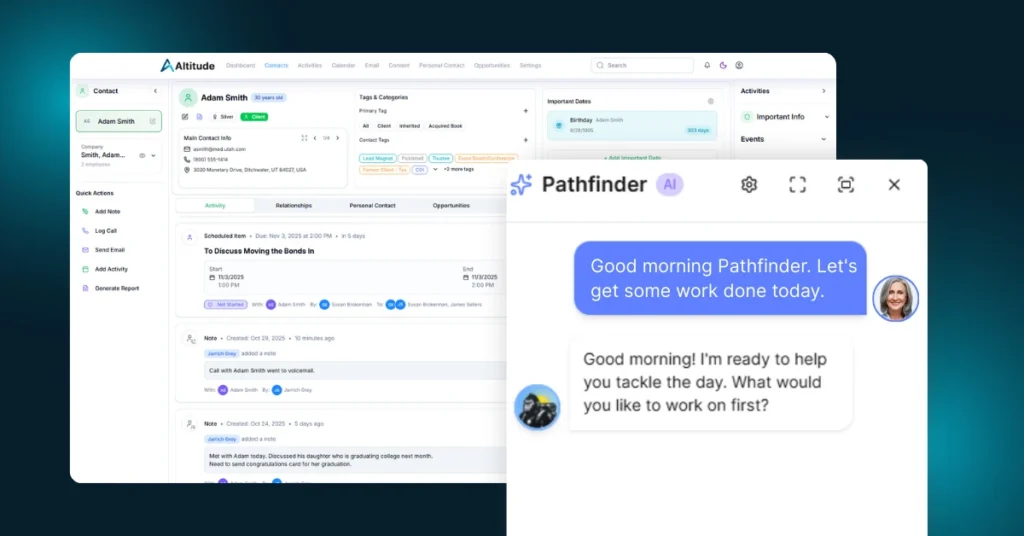
1. Altitude CRM: The Best Act! CRM Alternative for Growing Firms
Altitude CRM exists for one reason. To fix the friction financial advisors and sales teams feel every day inside legacy CRM systems. It’s an all-in-one CRM solution built specifically for firms that have outgrown contact databases and manual workflows.
Here’s where Altitude stands above the rest.
Instead of asking advisors and their teams to manage the CRM, Altitude focuses on supporting how the business already runs. Contact management, sales pipeline visibility, follow-ups, workflows, and automation features live in one place and actually work together.
The platform is AI-powered, but not in a gimmicky way. The intelligence, Pathfinder AI, is trained around real financial advisor behavior, real sales management patterns, and real customer interactions. It surfaces what needs attention, helps teams stay organized, and reduces the amount of manual cleanup most CRMs create.
Altitude is cloud-based, scalable, and built for team collaboration. No pile of add-ons. No fragile sync layers. Just a CRM system that helps sales teams stay focused on relationships instead of software.
Best fit for:
- Financial Advisors and RIAs replacing Act! CRM
- Sales teams that want clarity without complexity
- Firms that need automation without a steep learning curve
2. Redtail CRM
Redtail CRM is one of the most common names advisors compare against Act! CRM.
It’s familiar. It’s widely used. And for many firms, it feels like a safe move.
Redtail does a solid job with contact management and basic sales pipeline visibility. For teams coming from Act!, the transition often feels comfortable because the underlying structure isn’t dramatically different.
That familiarity is also where limitations start to show.
The user interface still feels dated compared to modern CRM software. Performance complaints come up as databases grow. Workflows and automation features exist, but they often feel rigid or limited. Many advisors still rely on manual follow-ups and outside tools to fill gaps.
Redtail works best for firms that want something recognizable and serviceable. It’s less compelling for teams looking to rethink how their CRM supports growth.
3. Wealthbox
Wealthbox is often praised for one thing above all else. Ease of use.
The interface is modern, clean, and approachable. Dashboards are simple. Navigation feels intuitive. For advisors frustrated with the learning curve of older CRM systems, that matters.
Wealthbox handles contact management, customer interactions, and basic pipeline management well. It’s especially appealing to small businesses and independent advisors who want a user-friendly CRM without heavy setup.
Where teams run into limits is depth.
Automation features are lighter. Complex workflows usually require workarounds. Reporting and segmentation can feel basic as business needs expand. Many firms eventually pair Wealthbox with additional marketing tools to support email campaigns and marketing automation.
Wealthbox is a good fit for teams prioritizing simplicity. It’s less ideal for firms that want their CRM to actively guide decisions.
4. Salesforce Financial Services Cloud
Salesforce Financial Services Cloud is built specifically for financial services, and it shows.
The platform supports deep customer data modeling, household relationships, sales management, and advanced automation. For large firms with dedicated admins, it can be incredibly powerful.
It’s also heavy.
Setup takes time and whole lotta MONEY. Customization requires expertise. Many workflows need configuration before they’re usable. Pricing scales quickly, especially once add-ons and automation features are layered in.
For firms coming from Act! CRM, Salesforce Financial Services Cloud often feels like a leap into a very different operating model. Some teams love the flexibility. Others find the complexity slows them down.
Salesforce FSC makes sense when scale and customization outweigh speed and simplicity.
5. AdvisorEngine
AdvisorEngine offers a broad wealth management platform that includes CRM functionality alongside marketing tools, client portals, and digital experiences.
For firms already invested in the AdvisorEngine ecosystem, the CRM can work as part of a larger business management stack. Client data, customer engagement, and digital tools live under one roof.
The challenge is focus.
The CRM system itself can feel secondary to the broader platform. Sales pipeline management and workflows are available, but they’re not always as flexible or intuitive as standalone CRM solutions. Teams often adapt their process to the software rather than the other way around.
AdvisorEngine works best for firms that want a tightly integrated platform. It’s less compelling for teams that want the CRM to be the central operating system.
Why Financial Advisors Ultimately Outgrow Act! CRM
Most teams don’t wake up one day and decide to replace their CRM.
It happens slowly.
- Data stops feeling reliable.
- Follow-ups move outside the system.
- Automation gets postponed.
- Reporting feels more like homework than insight.
Act! CRM still handles contact management, but as business needs change, the gaps become harder to ignore. What once supported the sales process starts adding friction to it.
That’s usually the moment teams start looking for alternatives.
How Altitude CRM Approaches CRM Differently
Altitude doesn’t treat CRM as a place to store information.
It treats it as a system that supports decisions.
Instead of asking teams to remember what matters, Altitude CRM surfaces it. Follow-ups, pipeline movement, customer interactions, and workflows are designed to reduce manual effort and keep sales teams focused.
It’s built to replace the workarounds that grow around legacy CRM systems.
Choosing the Right Act! CRM Alternative for Financial Advisors
For financial advisors, a CRM isn’t just sales software. It’s where client relationships live. It’s where service history, follow-ups, and years of institutional knowledge are stored. That’s why moving away from Act! CRM can feel like a bigger decision than switching any other piece of technology.
Most advisors aren’t chasing more features. They’re trying to remove friction from the day-to-day work of running a firm. They want clearer visibility into households and relationships, follow-ups that don’t rely on memory, and automation that supports their service model instead of adding more administrative work. They want a CRM system their team actually uses, and one they can trust.
When a CRM becomes a place where work is documented after it happens, it stops being useful. Modern advisory firms need a system that supports decisions in real time. One that helps prioritize the right conversations, keeps client service consistent, and scales as the firm grows without becoming harder to manage.
That’s where Altitude rises to the occasion.
Altitude CRM was built specifically for financial advisors who’ve outgrown legacy CRM software. It brings contact management, workflows, automation, and pipeline visibility into a single system designed around how advisory firms actually operate. Instead of forcing advisors to adapt to generic sales logic, Altitude supports real advisory workflows and helps teams stay focused on clients rather than software.
If you’re evaluating Act! CRM alternatives and want to see what a modern, advisor-focused CRM looks like in practice, the next step is straightforward.
Schedule a demo of Altitude CRM. See how it works with your firm’s processes, your data, and your team. Then decide if it’s the right foundation for where your practice is headed next.