Google users, this one’s for you. Altitude now connects to Google Workspace, so your Gmail and Google Calendar sync with your CRM automatically. It’s live today.
Securely connect your Google account once, and your email and calendar stay in step with everything in Altitude. No exporting, no manual updates, no keeping two systems in agreement by hand. For a financial advisor running a growing business, that’s one fewer place to check and one fewer thing to double-enter.
Here’s what the Google Workspace integration does, how to turn it on, and answers to the questions we hear most.
Gmail sync
Link your Google account and your Gmail flows into Altitude with your labels intact. Incoming and outgoing messages link to the right contact on their own, so every reply, forward, and follow-up lands on that person’s timeline automatically. Nothing to file, nothing to drag around.
That matters because your email is where a lot of the relationship actually happens. When your Gmail sits inside your CRM, you read a client thread and see their financial accounts, household members, and recent meetings on the same screen. The next time you write them, the full history is already in front of you.
Your Gmail data is protected in Altitude with field-level encryption, so sensitive message content stays secure at the level clients expect from a firm handling their finances.
Google Calendar sync
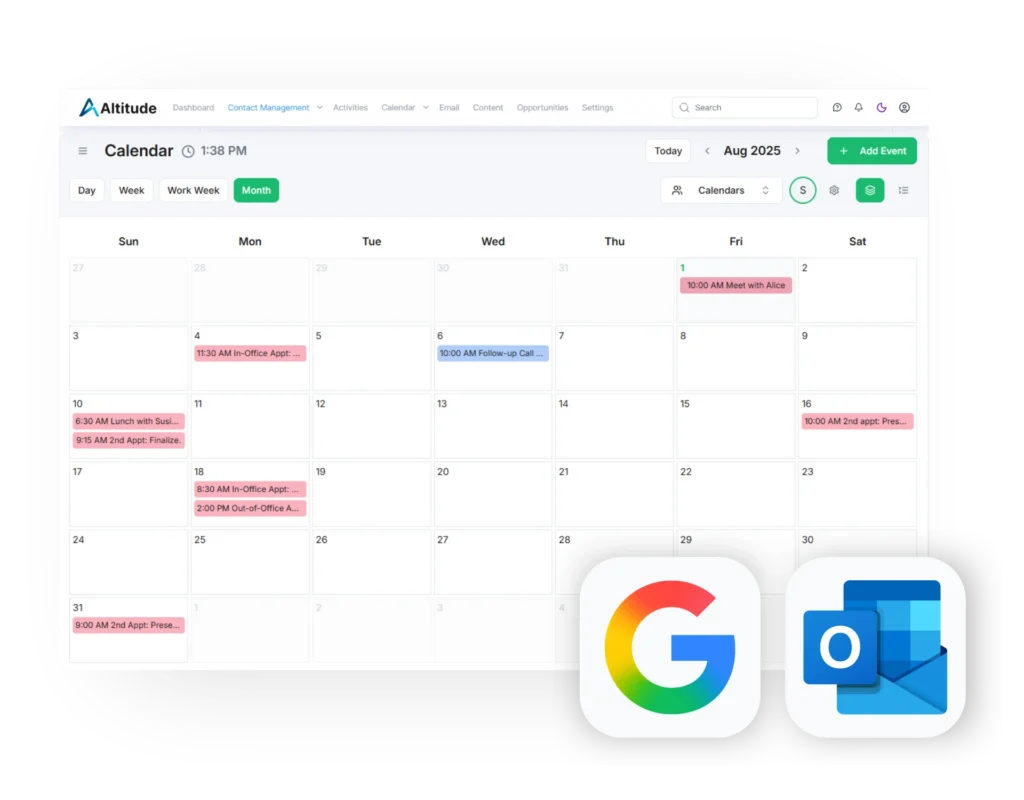
Your Google Calendar and your Altitude activities become a single calendar. Book a meeting in Altitude and it appears on your Google Calendar. Add or reschedule an event in Google Calendar and Altitude updates too.
The Google Calendar sync runs both directions. Change something on either side and the other catches up within moments. You see the same schedule whether you’re working in Altitude or in Google, which means no double-booked reviews and no appointments that exist in one place but not the other.
Bidirectional calendar sync also keeps your team in the loop. When your availability updates, the people scheduling on your behalf are looking at current information, not yesterday’s.
Two-way sync functionality
Plenty of tools offer some form of calendar connection. Many of them only read your calendar in one direction, which leaves you fixing the same event in two systems. Altitude’s Google sync updates both ways, so Google and your CRM always hold the same version of your day. You never have to decide which one is right.
How to connect Google Workspace to Altitude
Open your settings and go to the sync section. Connect a Google account (email, calendar, or both), grant access once, and the first sync pulls in your recent mail and events.
Setting up the whole firm? You can connect your team’s accounts from the same place, and our support team is glad to help you get everyone running.
Using Microsoft?
You’re covered too. Altitude already syncs with Microsoft 365 and Hosted Exchange, and that hasn’t changed. The new Google Workspace integration simply adds another option, so everyone at your firm can connect whichever accounts they actually use. Half your office on Google and half on Microsoft is no problem.
New to Altitude?
If you’re not using Altitude yet, we’d love for you to come take a look. Altitude is a CRM built specifically for financial advisors, with your email, calendar, contacts, and pipeline in one place, plus AI tools that handle the busywork so you can spend more time with clients.
Book a demo and we’ll show you how Altitude works with the Google Workspace tools you already run your day on.

FAQs about Altitude CRM’s Google Sync
Yes. Altitude CRM connects directly to Gmail. Once you link your Google account, your email syncs into Altitude, your labels carry over, and messages link automatically to the matching contact’s timeline.
Yes. Altitude syncs with Google Calendar in both directions. Meetings you create in Altitude appear on your Google Calendar, and events you add or change in Google Calendar update inside Altitude.
No. Altitude CRM supports Google Workspace, Microsoft 365, and Hosted Exchange. You connect whichever account you use, and different people at the same firm can connect different providers.
Yes. Altitude protects email content with field-level encryption, which is important for a CRM built for financial advisors handling sensitive client information.